
The first three seconds a website takes to load are very critical, as conversions are often won or lost within this short window. Approximately 53% of mobile users leave a website when loading time exceeds three seconds. For those who wait, every second delay cuts their conversion potential by 7%.
WordPress web maintenance plays a critical role in keeping the functionality and speed of a website. Every time a business postpones automatic or manual maintenance, numerous external technologies continue receiving updates that may eventually conflict with the website’s existing code. As compatibility issues accumulate, pages take longer to process requests—slowing down overall website performance.
The biggest risk of no maintenance, however, is security vulnerabilities that hackers can exploit through outdated software, plugins, or system infrastructure.
A typical website maintenance should be performed at least once a month, while high-traffic and e-commerce websites may require weekly or even daily monitoring. Knowing what to do during a website checkup helps businesses streamline the process and avoid overlooking technical issues.
What Comprehensive Web Maintenance Looks Like Today
Websites today can become outdated in a matter of weeks. Modern websites depend on constantly evolving external systems (e.g., plugins, API, security patches). These components update independently and frequently, so even if your website itself doesn’t change, compatibility issues can still develop over time.
For example, 75% of Application Programming Interfaces (APIs) change daily and weekly. This fast pace of change can create shadow and dead APIs, which contribute to system inefficiencies and are attractive targets for attackers exploiting security gaps.
While some might think of WordPress web maintenance as a time-consuming or bothersome task, regular maintenance remains necessary for keeping websites stable, secure, and responsive. Fortunately, businesses today are no longer doing this alone. Business owners can now hire a marketing agency Philippines to assist with website maintenance and optimization. Tools like Cloudflare and Google Search Console are also available to handle web optimization work.
Tips for WordPress Web Maintenance in 2026
It’s ideal to conduct WordPress web maintenance during low-traffic hours. From there, several key practices help ensure smooth and effective WP maintenance services PH.
1. Isolate Every Single Code Update in a Sandbox Environment
Never deploy a plugin update, theme modification, or core system upgrade directly onto your live website. This practice is one of the common causes of sudden website crashes because it risks triggering immediate code incompatibilities among existing third-party software and site configurations.
The ideal thing to do is to establish a dedicated duplicate staging environment to test new files first. This isolated sandbox lets you identify code conflicts, database errors, or broken layouts safely before exposing them to active online visitors.
2. Audit Third-Party Dependencies and Plugins
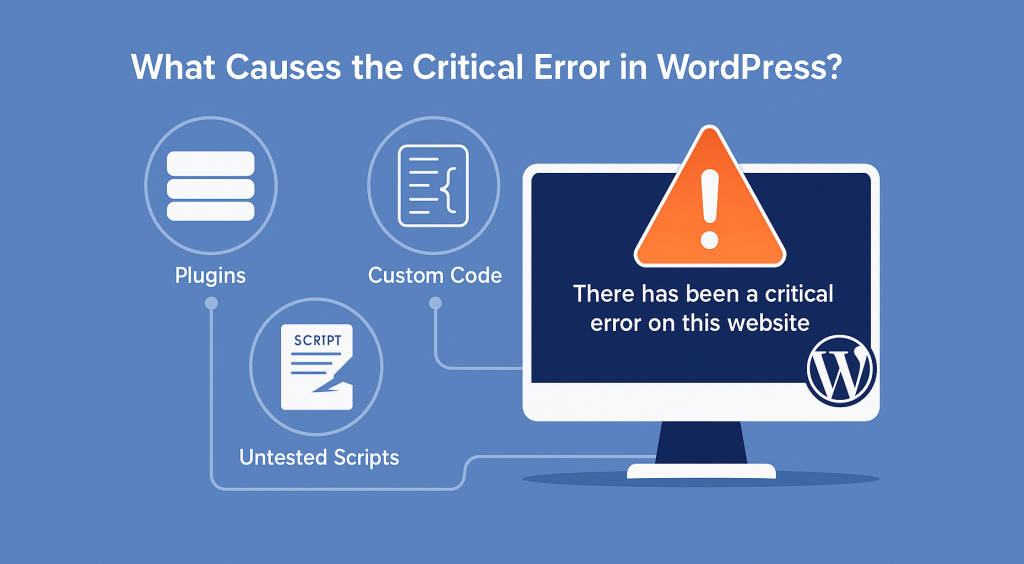
Image from WPBeginner
A best practice in WordPress web maintenance is keeping a site’s code architecture thin. Every additional extension may increase server workload and raise the risk of software conflicts over time. To avoid this, run monthly extension evaluations and delete tools that are no longer essential.
For example, many retail websites install a multi-vendor booking plugin just to show a simple, static list of store opening hours. These systems often load unnecessary scripts and backend functions that increase server workload, especially for mobile users. What you can do instead is copy the schedule into a basic text block and deactivate the bloated plugin to cut your server processing requests.
3. Purge Dead System Endpoints
Deploy automated maintenance tools, like crawlers, to help uncover broken internal or external 404 navigation errors and endless redirect loops. When doing WordPress web maintenance, eliminate these technical dead ends to prevent user frustration and stop visitors from abandoning your site when they hit broken paths.
Google Search Console (GSC) can compile a list of every 404 error page it encounters on your website. The Indexing reports in GSC help identify affected URLs, coverage issues, and pages that may require review.
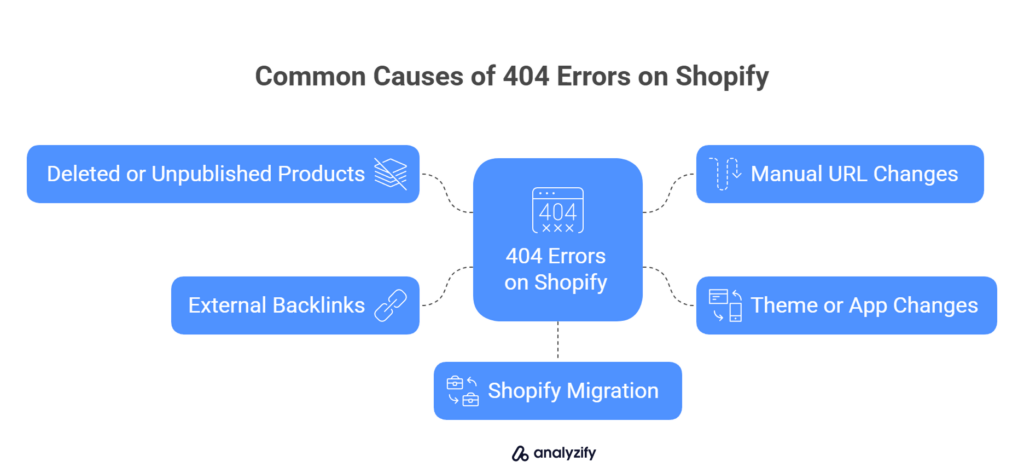
Image from Analyzify
4. Maintain Seamless Consumer Pathways
Test your lead forms, purchase buttons, and checkout scripts frequently to eliminate point-of-sale drop-offs during the buying process. This WordPress web maintenance can be done manually by executing a complete end-to-end user journey through an incognito browser window.
Automated workflow monitoring tools also help identify technical issues faster. These systems simulate form submissions and user interactions while sending alerts when backend scripts stop functioning properly.
5. Enforce Strict Security Configurations
Configure automated web application firewalls (WAFs) to defend your infrastructure against bot-driven security threats. Unlike standard network firewalls that only monitor basic data ports, a WAF inspects the actual content of every incoming web request in real time to detect suspicious behavior.
Configure your WAF rules to restrict how many times a single user or machine can click pages, submit forms, or attempt logins within a 60-second window. This automated defense structure immediately blocks threat scripts that attempt brute-force login attacks or try to scrape your inventory data.
What Happens If You Don’t Maintain Your Website?
A website requires ongoing maintenance to remain efficient and secure. When regular upkeep is ignored, small technical issues can build up and eventually affect overall site performance.
Here are the most common problems that arise when regular WordPress web maintenance is neglected:
Slow Website
When you do not optimize your site database or clear out caching issues, page speeds slow down drastically. Industry research reveals that if a mobile website’s load time increases from just 1 to 3 seconds, the bounce rate spikes by 32%. If it stretches to 5 seconds, the rate jumps by 90%. Modern web consumers expect instant responsiveness, and not conducting WordPress web maintenance creates loading delays that have catastrophic effects on user retention.
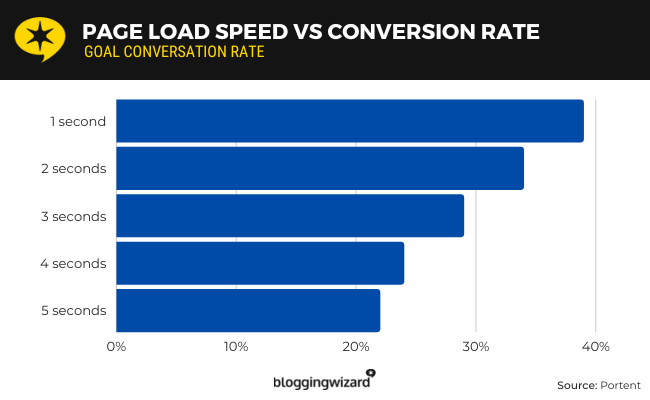
Image from Blogging Wizard
Drop in SEO Rankings
Google considers page speed, mobile usability, and overall page experience when evaluating websites. So when your website is not maintained regularly, hidden performance issues compound over time and directly degrade your search engine visibility and organic rankings.
Suppose you and a competitor publish equally great content, but your competitor maintains their website (fast loading, seamless interactivity) while yours is bogged down by unoptimized scripts. Google will rank the faster site above yours.
Cybersecurity Risks
Websites left without routine security patches become easy targets for automated botnets and malicious threats. Over 96% of all content management system (CMS) vulnerabilities stem directly from third-party plugins and themes. This means every unpatched tool on your site serves as an active backdoor for cybersecurity attacks.
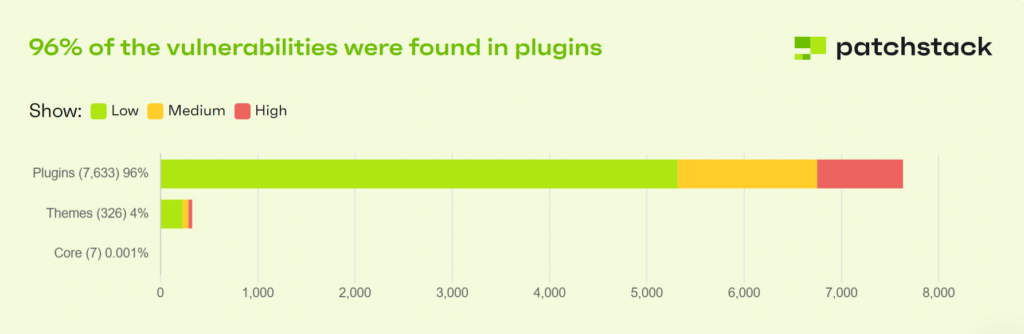
Image from Patchstack
Maintain Fast Websites with Professional Support
A website is a business asset that also requires continuous technical calibration to remain profitable. With consistent WordPress web maintenance, you can keep the user experience running smoothly and avoid users bouncing from the site. If you’ve already invested in website development and design, maintenance ensures that it continues to deliver results over time.
But website upkeep takes time and technical know-how. Give this function the proper attention by partnering with Digital Marketing Philippines (DMP). As your dedicated technical partner, DMP offloads the complex backend operations required to keep your business platform secure, operational, and fast.
Contact us to learn more about our WordPress web maintenance service today!
References
https://developers.google.com/search/docs/appearance/core-web-vitals
https://www.checkpoint.com/security-report
https://whitehat-seo.co.uk/blog/wordpress-security-issues
https://www.forbes.com/advisor/business/software/website-statistics/https://aioseo.com/abc-of-wordpress-site-maintenance/

Jomer B. Gregorio is a well-rounded expert when it comes digital marketing. Jomer is also known as a semantic SEO evangelist and practitioner. Check out our Digital Marketing Services today and let us help you in achieving positive and profitable results for your business.