
The holiday season often brings a noticeable increase in online shopping. From the BER season sale to Christmas promotions and year-end clearance events, customers browse product pages, compare prices, and place orders while looking for gifts and special offers. A website that performs well during these busy months can help businesses turn seasonal interest into actual sales.
- 1. Test Your Website's Loading Speed
- 2. Check Whether Your Hosting Can Handle More Visitors
- 3. Make Mobile Shopping Easy
- 4. Review Product Pages and Inventory Information
- 5. Test the Entire Checkout Process
- 6. Verify Website Security and Data Protection
- 7. Confirm Your Promotions and Discount Codes
- 8. Update Delivery Details and Customer Support
- 9. Prepare Your Website for Holiday Traffic From Search and Campaigns
- 10. Review Your SEO Strategy and Seasonal Content
- Give Your Website a Competitive Edge This Holiday Season With DMP
However, increased holiday demand can expose weaknesses in a website’s ability to handle traffic and serve customers effectively. According to Liquid Web, 12% of consumers place a better online experience above product quality when deciding which brands to remain loyal to. This finding highlights why businesses should review their websites before the holiday season. Getting your website for the holiday rush ready involves more than checking its appearance. Every part of the customer journey should work as expected, from the first visit to the final order confirmation.
Here are 10 areas to review before holiday promotions begin:
1. Test Your Website’s Loading Speed
Shoppers often visit several websites before deciding where to buy. If your pages take too long to load, potential customers may leave before viewing your products or services. Slow performance can also affect search visibility and discourage visitors from proceeding to checkout. In fact, 76% of consumers have left items in their carts unpurchased because a website loaded too slowly, highlighting how page speed can influence purchasing decisions.
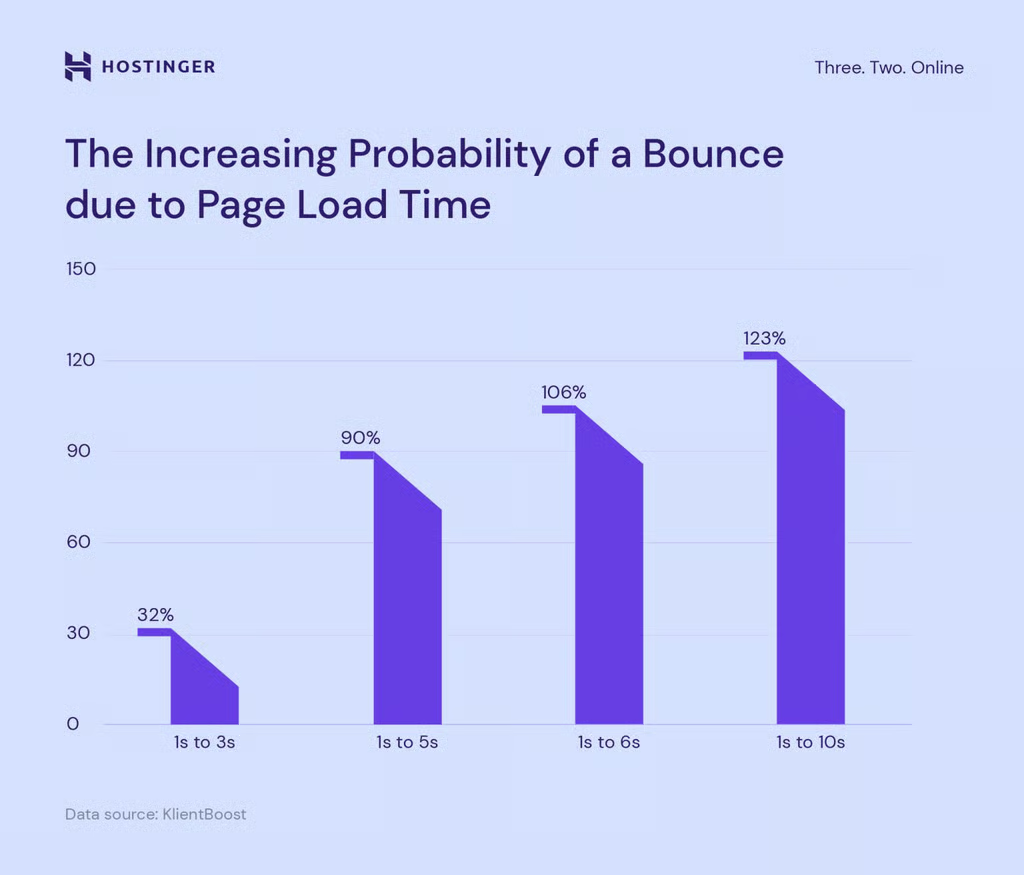
Image from Hostinger
Start by testing your homepage, product pages, category pages, and checkout process. Use the results to identify areas that need attention, such as oversized images, unused plugins, or missing browser caching. Compress image files, remove unnecessary plugins, and enable browser caching where appropriate.
Run your website through Google PageSpeed Insights to spot performance issues on mobile and desktop. Review its recommendations before making changes, then test the website again to check whether loading speed has improved.
2. Check Whether Your Hosting Can Handle More Visitors
A website may perform well on an ordinary day but struggle when a promotion attracts hundreds or thousands of visitors at once. Limited server resources, inefficient database queries, and poorly configured applications can cause slowdowns or downtime during peak periods.
Contact your hosting provider about traffic limits, available server resources, backup procedures, and options for scaling capacity. Businesses anticipating substantial traffic increases may also benefit from a content delivery network (CDN), which distributes website content across servers in different locations to speed up delivery and reduce the load on the main server.
3. Make Mobile Shopping Easy
Many consumers browse online stores using smartphones, particularly when checking social media promotions or shopping while away from home. With 55% of buyers making mobile purchases after discovering products on social media, your website needs to provide a mobile-friendly shopping experience that makes it easy for customers to explore products and complete purchases on smaller screens.
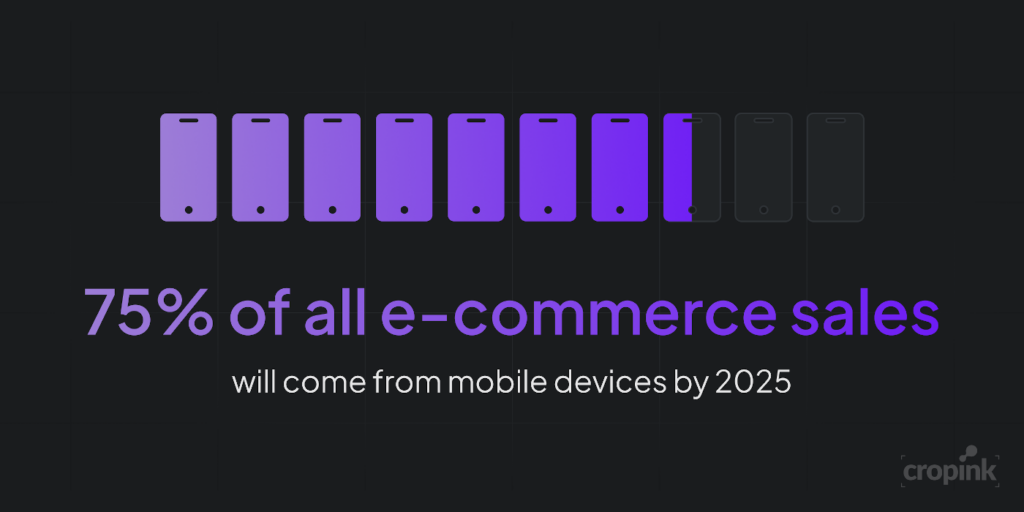
Image from Cropink
Open your website on different mobile devices and check the following:
- Navigation menus are easy to open and use.
- Product images remain clear without slowing down the page.
- Text is readable without zooming in.
- Buttons have enough space to prevent accidental taps.
- Forms are short enough to complete on a phone.
- Checkout fields work properly with mobile keyboards.
Pay special attention to payment buttons, delivery options, and order summaries. Shoppers should be able to complete a purchase without switching to a computer to finish the transaction.
4. Review Product Pages and Inventory Information
Holiday shoppers compare products before deciding what to buy. Missing specifications, outdated prices, and unclear delivery details can discourage purchases.
Review your best-selling products first, followed by seasonal items and promotional bundles. Confirm that every product page displays accurate prices, up-to-date product images, available variations, and current stock information. If an item is sold out, update its availability instead of accepting orders you cannot fulfill.
Product descriptions should answer common customer questions about size, materials, compatibility, warranties, or other relevant details. Clear information helps shoppers choose the right item and lowers the risk of returns caused by misunderstandings.
5. Test the Entire Checkout Process
Adding products to a cart does not guarantee a sale. Customers may abandon purchases when checkout is complicated, payment options are limited, or unexpected charges appear near the end.
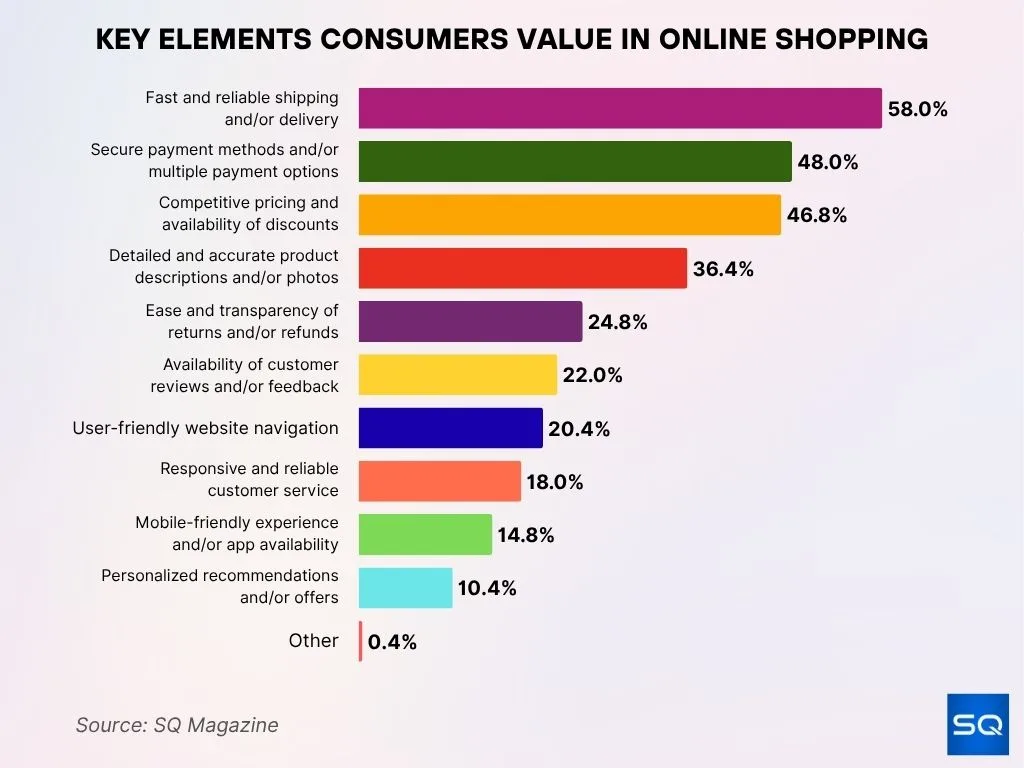
Image from SQ Magazine
Complete a test order from start to finish. Check whether customers can enter their delivery details, apply discount codes, select shipping options, and choose their preferred payment method. Verify that the order confirmation appears correctly and that the business receives the order notification.
Display shipping fees, estimated delivery dates, and additional charges before customers submit their orders. Test guest checkout as well, if available, and remove unnecessary fields or steps that could make completing a purchase more difficult.
6. Verify Website Security and Data Protection
Holiday promotions can attract more customers, but they can also create more opportunities for fraudulent activity. Protecting customer information and maintaining secure payment processes should remain a priority during busy shopping periods.
Prioritize these checks:
- HTTPS Certificates – Confirm that the SSL/TLS certificate is valid, and that pages load securely.
- Software Updates – Update your content management system, themes, plugins, and other website components.
- User Permissions – Remove unused accounts and restrict administrative access to authorized users.
- Recovery Procedures – Verify that backups are working and that your website can be restored after an incident.
- Customer Data – Follow your payment provider’s security requirements and display clear privacy information.
7. Confirm Your Promotions and Discount Codes
Seasonal campaigns often involve multiple offers, including bundle deals, limited-time discounts, free shipping, and loyalty rewards. Incorrect settings can reduce profit margins or frustrate customers who expect a particular deal.
Before publishing a campaign, verify the start and end dates, eligible products, minimum spending requirements, and discount limits. Test each coupon code with qualifying and non-qualifying orders to confirm that the rules work correctly.
Beyond testing the discounts themselves, coordinate your promotional banners, product prices, email announcements, and social media posts for Black Friday and Cyber Monday campaigns. Ensure every channel communicates the same offer, including its terms and expiration date. Remove expired banners promptly so visitors do not encounter discounts that are no longer available.
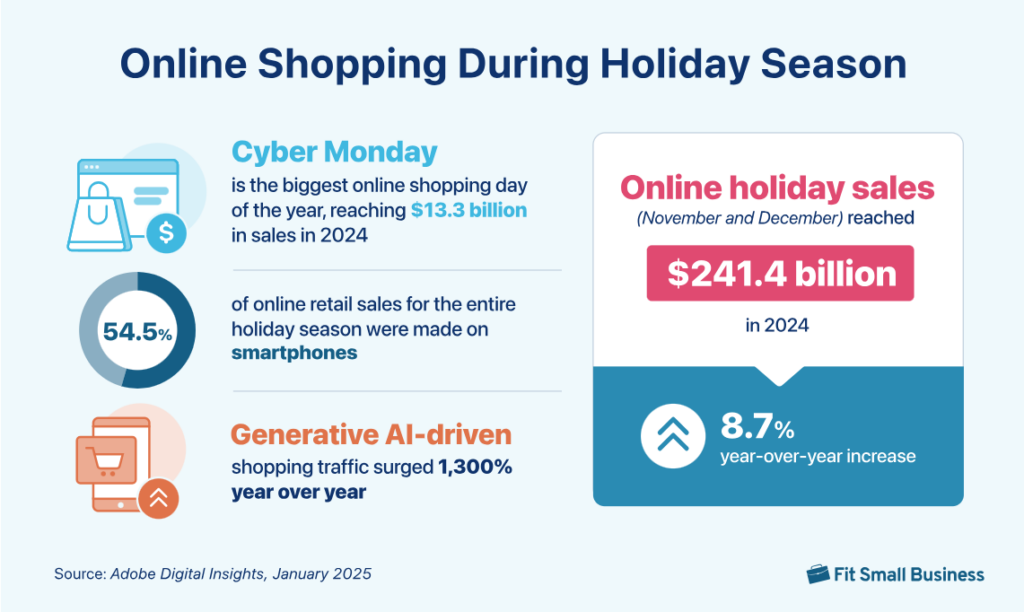
Image from Fit Small Business
8. Update Delivery Details and Customer Support
Holiday orders may face courier delays, particularly when demand increases near Christmas. The season also accounts for 24% of online shopping activity, making it important to prepare for higher order volumes and customer inquiries. Customers need accurate information about shipping, returns, and order status to plan their purchases and know what to expect.
Prepare your fulfillment and customer support teams before promotional campaigns begin. Review the following details:
- Shipping Schedules – Confirm courier availability, cutoff dates, and regional restrictions.
- Delivery Estimates – Display realistic arrival dates and explain potential delays.
- Contact information – Test email addresses, phone numbers, messaging links, and contact forms to confirm that customers can reach your team.
- Frequently Asked Questions – Update information about shipping, exchanges, returns, and order tracking.
- Response Templates – Prepare answers to common inquiries so your team can respond promptly with consistent and accurate information.
9. Prepare Your Website for Holiday Traffic From Search and Campaigns
Seasonal traffic does not come from a single source. Visitors may arrive through Google searches, social media posts, paid advertisements, email campaigns, or links shared by existing customers. Your website for the holiday rush should direct these visitors to relevant pages and make it easy for them to take the next step.
Review page titles, meta descriptions, internal links, and product category structures. Make sure search engines can access important pages and that seasonal landing pages provide useful information about featured products, promotions, and purchase requirements. Check that advertisements lead to the correct product or offer rather than a generic homepage.
Businesses investing in online marketing Philippines campaigns should also check tracking tools before launch. Test analytics events, conversion tracking, and campaign links to determine which channels generate visits, inquiries, and purchases. Reliable data helps you adjust advertising spend and promotional messages while the campaign is running.
10. Review Your SEO Strategy and Seasonal Content
Seasonal searches can reveal what customers want to find during the holiday period. Reviewing existing content and publishing relevant resources ahead of peak demand can help your website address these searches and direct visitors to suitable products or services.
Start with these steps:
- Create seasonal gift guides and buying resources that address common customer questions.
- Refresh existing content to reflect seasonal search intent, current promotions, and relevant product information.
- Improve internal links so visitors can discover related products, category pages, and helpful resources.
- Review technical SEO issues that may affect crawling, indexing, or the visibility of important pages.
Businesses with limited marketing budgets can explore affordable SEO services for small business Philippines to improve their site’s technical health, content quality, and organic search strategy. If your team needs more specialized support, it may also be worth considering whether to hire SEO expert Philippines services to manage technical improvements and seasonal search planning.
Give Your Website a Competitive Edge This Holiday Season With DMP
The holiday season brings more opportunities to attract shoppers and increase sales. Prepare website for holiday traffic helps your business make the most of increased seasonal demand and reach customers when they’re ready to shop.
Digital Marketing Philippines (DMP) offers SEO, website optimization, and digital marketing services to help businesses prepare for peak shopping periods. From improving your website’s search presence to making product pages easier to navigate, our team can help you attract more customers and provide a better shopping experience.
Don’t wait until your website struggles to keep up with demand. Get in touch with us today to explore how our services can help your business prepare for the holiday rush and increase sales.
References:
https://www.linkedin.com/pulse/your-e-commerce-website-ready-holiday-rush-heres-how-khanna-ani–zmg9f

Jomer B. Gregorio is a well-rounded expert when it comes digital marketing. Jomer is also known as a semantic SEO evangelist and practitioner. Check out our Digital Marketing Services today and let us help you in achieving positive and profitable results for your business.