
Maps used to be simple. You typed a place, followed directions, and arrived. That basic function is still there, but things have become more interactive. People can now ask questions directly inside Maps, turning it from a navigation tool into a guide that responds in real time.
- 1. You Can Ask Questions Instead of Typing Commands
- 2. It Plans Trips Through Conversation
- 3. It Understands Space, Not Just Locations
- 4. You Can Preview Routes in 3D Before You Go
- 5. It Suggests Places Based on Mood and Context
- 6. It Refines Suggestions Through Follow-Up Questions
- 7. It Surfaces Hidden Local Gems
- 8. It Connects Discovery With Business Visibility
- 9. It Remembers Preferences Over Time
- 10. It Bridges Online Search With Real-World Decisions
- Difference Between Old Google Maps Q&A and Ask Maps
- Get Seen, Get Chosen, Grow Faster With DMP
This shift introduces Google Ask Maps, a feature that connects location data with conversational prompts. It changes how people explore unfamiliar places and how they move through familiar ones. At the same time, this AI-powered tool highlights relevant spots and gives clear, specific details for each destination.
Here are some ways Ask Maps changes how people search and discover inside Google Maps:
1. You Can Ask Questions Instead of Typing Commands
Search bars used to rely on exact wording. A missing word or a wrong phrase often led to irrelevant results. That friction has been reduced. You can now ask full questions, and Maps responds with useful answers.
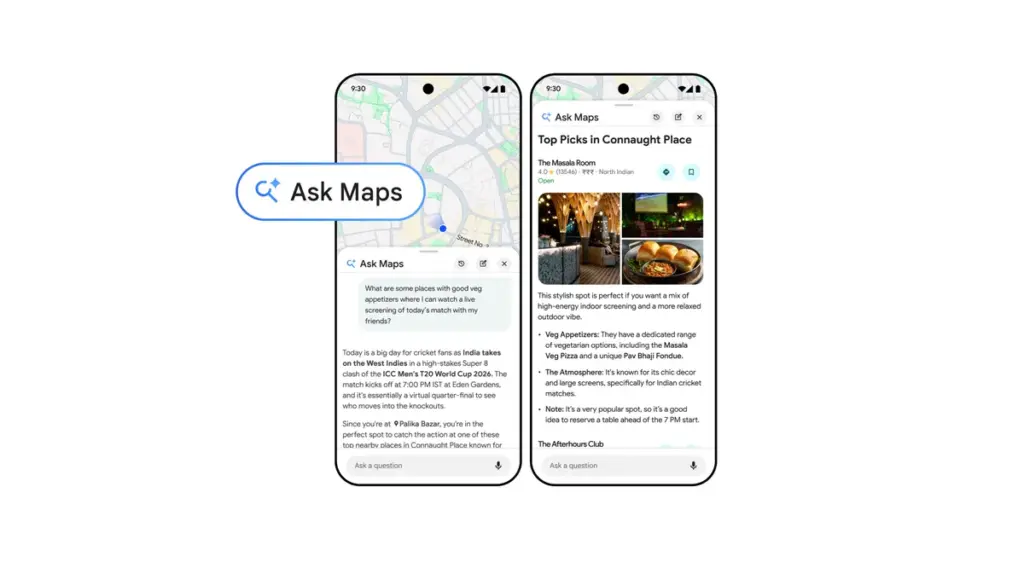
Image from Google
Instead of worrying about the “right” keywords, you can phrase your search the way you normally speak. You might ask, “Where can I find quiet coffee shops nearby?” and still get relevant suggestions. The system interprets your intent, then filters places based on reviews, foot traffic patterns, and user behavior. Responses feel closer to recommendations rather than standard search results.
This is part of Google Ask Maps, which allows natural phrasing without strict formatting. It shifts the focus from keywords to actual intent.
2. It Plans Trips Through Conversation
Trip planning often involves switching between tabs, apps, and lists. Ask Maps keeps everything in one place and builds your plans as you go.
You can start with a broad idea, then add preferences and adjust plans in real time along the way. The system refines suggestions with each input.
This is what conversational trip planning is about. Instead of mapping everything manually, users shape trips through simple back-and-forth.
3. It Understands Space, Not Just Locations
Maps used to rely heavily on labels and coordinates. That method works, but it doesn’t always match how people actually experience places. A newer update brings a stronger sense of spatial awareness.
Rather than thinking in exact addresses, you can describe places the way you see them. Ask about spots “near the entrance,” “around the corner,” or “next to the park,” and Maps can interpret those relationships. Physical positioning connects with real-world layout, making results easier to picture.
Behind this improvement is Gemini’s spatial understanding. It processes how locations relate to each other, not just where they sit on a grid, so results feel more grounded.
4. You Can Preview Routes in 3D Before You Go
Directions used to show up as flat lines on a map. Simple routes still work fine that way, but more complex areas often need extra clarity.
Ask Maps now offers a visual walkthrough of your routes. You can see turns, landmarks, and intersections before heading out. It reduces uncertainty, especially in places you’re not familiar with.
Immersive navigation 3D powers this experience. It adds depth to the map so you can see what streets actually look like instead of just reading them.
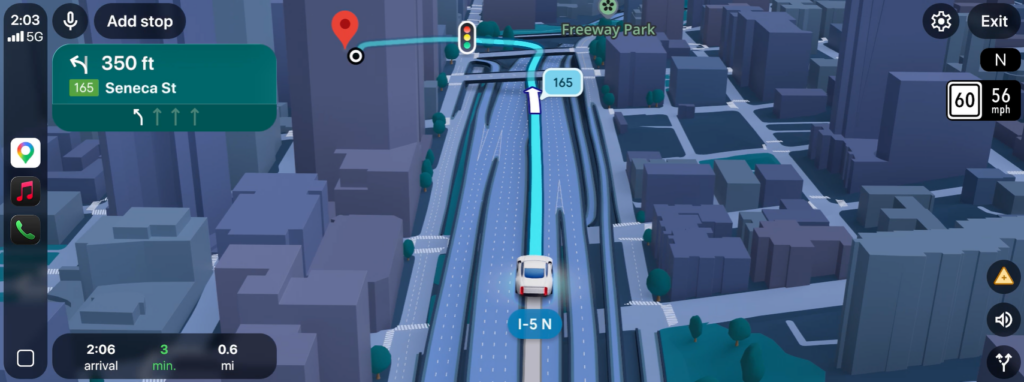
Image from Google
5. It Suggests Places Based on Mood and Context
Search filters are used to narrow results by category. Restaurants, cafes, and shops were easy to find, but choices felt limited. A shift in how results are generated has made things more flexible.
Instead of naming a category, you can describe the kind of experience you want. Words like “relaxing,” “busy,” or “late-night” help shape the results. Ask Maps pulls signals from reviews, photos, and activity patterns to better match that intent.
Browsing no longer feels like scrolling through a fixed list. Suggestions come across as tailored options that reflect what you have in mind at the moment.
6. It Refines Suggestions Through Follow-Up Questions
Most map tools stop after giving results. Ask Maps continues the interaction. You can refine suggestions with follow-up prompts like “make it more budget-friendly” or “add places with outdoor seating.”
Each adjustment reshapes the list without restarting your search. This flow mirrors natural conversation, making the experience feel less rigid.
7. It Surfaces Hidden Local Gems
Popular spots tend to dominate search results. Ask Maps digs deeper. It brings forward lesser-known places that align with specific preferences.
A small cafe with consistent high ratings might appear over a larger chain if it better matches the query. This shift helps you discover places you might not encounter through traditional search.
8. It Connects Discovery With Business Visibility
Businesses have always relied on Maps for exposure. That connection has become more refined.
Accurate details, strong reviews, and consistent updates now influence visibility more directly. Businesses that maintain their profiles gain better search results placement.
This aligns closely with local SEO, where visibility depends on relevance, accuracy, and engagement. Maps act as both a discovery tool and a competitive space.
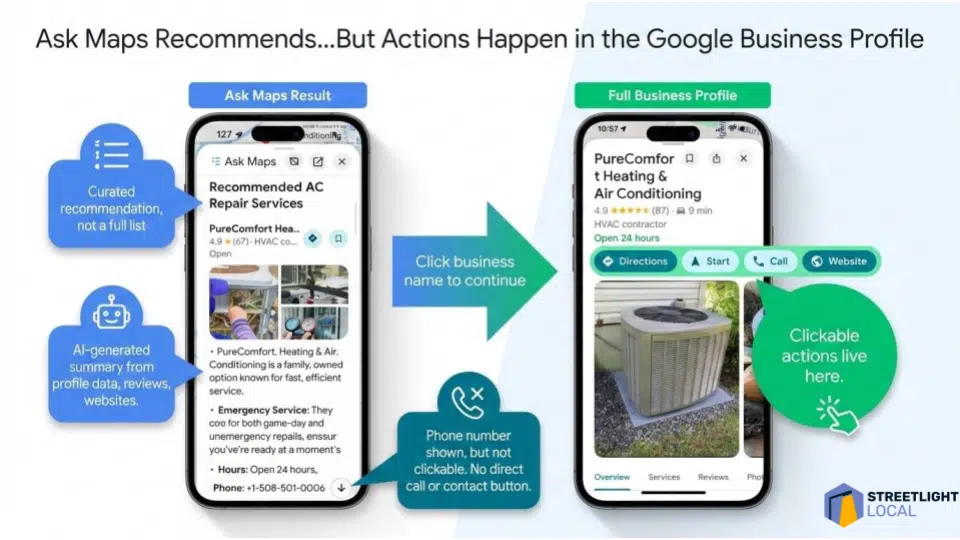
Image from Search Engine Land
9. It Remembers Preferences Over Time
Frequent searches reveal patterns. Maps uses those patterns to improve future suggestions.
If you often visit certain types of places, similar options appear more often. Preferred routes also guide navigation, while saved locations help refine recommendations. Over time, this creates a personalized experience without requiring constant input.
10. It Bridges Online Search With Real-World Decisions
The gap between searching and acting has narrowed. Maps connect research with immediate action.
You can view reviews, check photos, confirm availability, and navigate without leaving the app. Each step flows into the next, so there’s less hesitation, and decisions happen faster because everything is already connected.
Difference Between Old Google Maps Q&A and Ask Maps
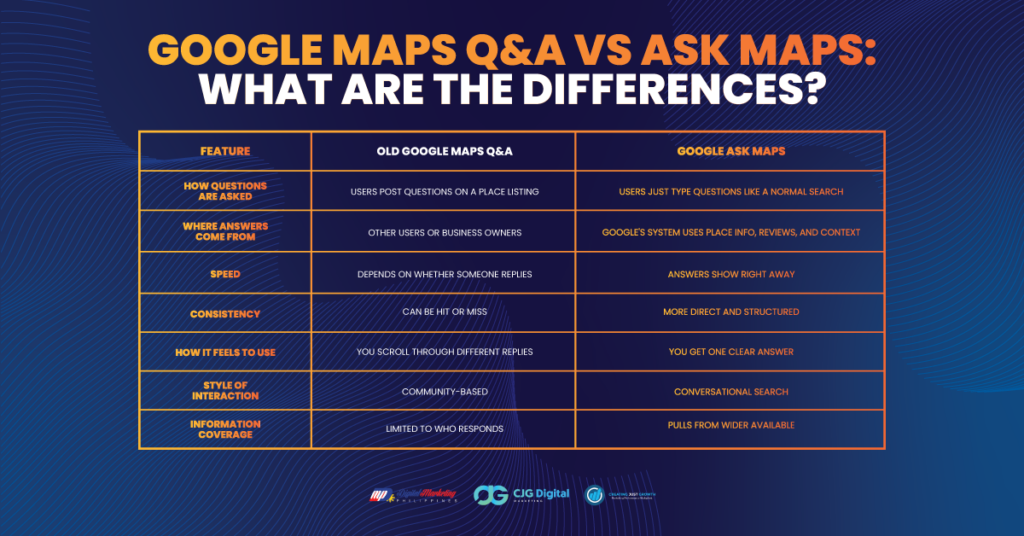
Google’s Q&A API was officially discontinued on November 3, 2025. Instead of scrolling through business-written questions and answers, searchers can now use Ask Maps to get direct, AI-powered responses inside the app.
Here’s a quick comparison of how the old Q&A feature differs from Google Ask Maps:
Get Seen, Get Chosen, Grow Faster With DMP
Maps are no longer a simple tool for directions. They respond, adapt, and guide decisions in ways that feel closer to how people naturally think. Finding places feels simpler, and planning a visit feels easier to manage.
The same idea applies to how businesses show up online. Being visible is not enough anymore. What matters is appearing at the right time, with the right information, in the right place.
Digital Marketing Philippines (DMP) helps businesses show up where people are already searching, especially on Google Maps. We strengthen listings, improve local search presence, and make it easier for customers to find and choose your business.
Connect with us and build a presence that meets your audience right when they are searching.
References:
https://www.wired.com/story/google-maps-ask-maps-gemini-powered-tool

Jomer B. Gregorio is a well-rounded expert when it comes digital marketing. Jomer is also known as a semantic SEO evangelist and practitioner. Check out our Digital Marketing Services today and let us help you in achieving positive and profitable results for your business.