
For many years, image search engine optimization (SEO) was treated as an auxiliary tactic that mainly focused on ranking within the isolated Google Images tab. However, users now routinely snap product pictures on smartphones and use Circle to Search on Android, or upload screenshots directly into Google to pinpoint brands and discover related information.
On September 24, 2026, Google Search Console (GSC) introduced Multimodal Search Performance with Search Console. This revolutionary feature tracks website traffic and impressions from image-led search queries, not text-only searches.
GSC’s update changes online marketing in the Philippines and the overall SEO game, granting publishers direct visibility into how content performs when searches are triggered by visual assets rather than standard text.
The Architecture of Multimodal Search Reporting
Google Search Console now separates multimodal web searches from other web search activity through a dedicated filter. The update gives website owners a clearer view of how their content performs when users search with images. Instead of relying solely on overall web search metrics, site owners can examine impressions and clicks associated with these visual search experiences.
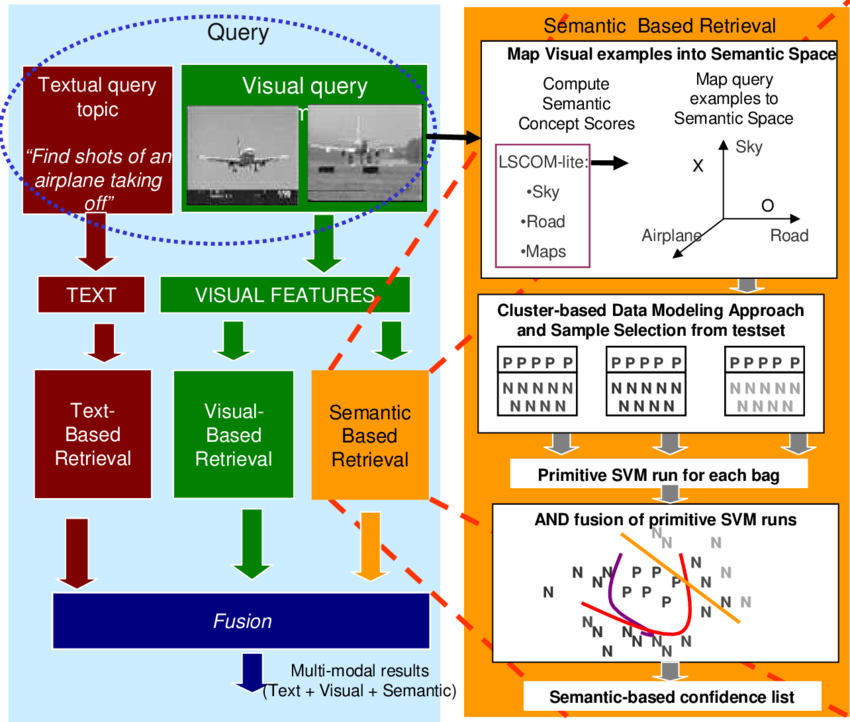
Image from ResearchGate
Google’s John Mueller stated that these specific image-led queries were not previously aggregated into standard web search totals. Additionally, site owners may observe notable shifts in their macro traffic data as the filter rolls out globally.
The Google Search Console Web Multimodal filter isolates search behavior initiated through four primary visual channels:
- Google Lens – Mobile searches conducted through smartphone camera widgets or the dedicated Google Lens application to identify objects and find related information.
- Circle to Search – Android-native interactions where a user gestures or circles elements directly on their screen to prompt a web inquiry.
- Direct Image Uploads – Image files or screenshots are dragged or uploaded straight into the primary Google Search bar.
- Chrome Context Visual Search – Desktop or mobile actions leveraging the right-click “Search this Image” command within the Google Chrome browser.
How to Navigate and Extract Multimodal Data in GSC
In the new Multimodal reporting feature, the data populates automatically without requiring custom tags or developer deployment once a site begins receiving qualified image-led traffic.
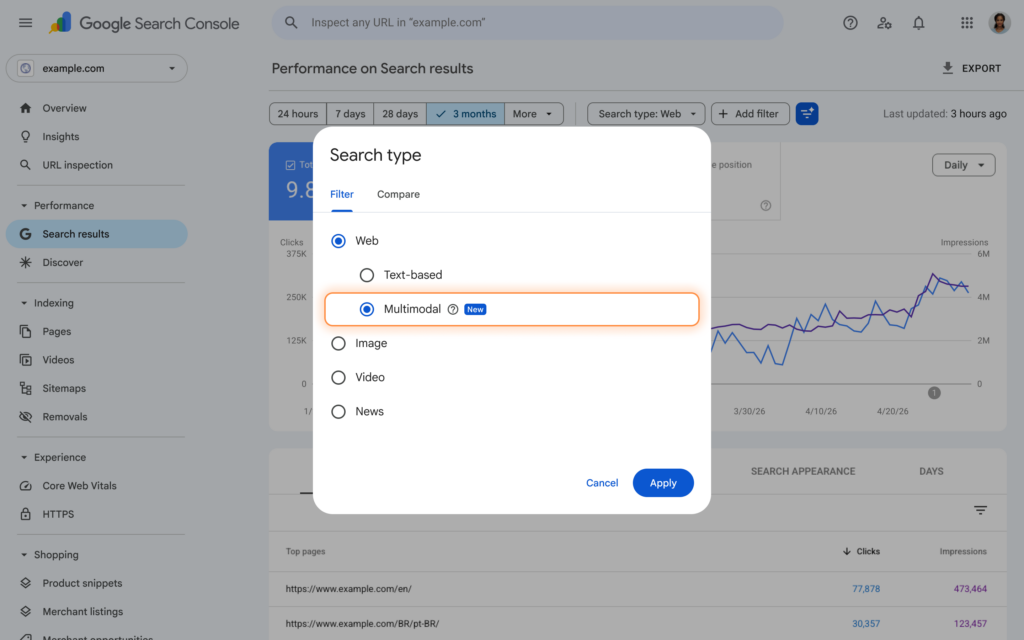
Image from Google Search Central
Brands must use the following workflow to audit and benchmark multimodal search Performance with Search Console:
Step 1: Open the Correct Performance Report
Log in to Google Search Console (GSC) and select the primary property. Afterward, navigate to the left sidebar and select Performance, then Search results.
Note: For brands whose strategy focuses heavily on modern algorithmic features, navigate instead to the Generative AI features report, where the multimodal filter is also fully integrated to isolate visual traffic flowing into AI Overviews and AI Mode.
Step 2: Apply the Multimodal Search Type Filter
At the top of the interface, click on the Search type filter, which is defaulted to “Web.” Expand the sub-options under the Web category, check Multimodal, and click on “Apply.”
Step 3: Audit Dimensions via the Tabbed UI
Once applied, the interactive line chart renders exclusive impressions, clicks, click-through rate (CTR), and average position lines generated by visual interactions. To slice this data further, use the following sub-tabs below the chart:
- Pages – Reveals the exact target URLs Google displayed to the visual searcher.
- Countries and Devices – Identifies regional demand and validates mobile vs desktop distributions. Given the camera-first nature of Lens, this may heavily skew toward mobile devices.
Step 4: Data Export
Because the data is not yet accessible via the standard Search Console API, manual extraction is required for deeper modeling.
To extract the Multimodal Search Performance data, click the export button in the upper-right corner to download a clean CSV or Excel file, or push the data directly into a Google Sheets workbook for cross-quarter analysis.
Understanding Critical Core Constraints
While this update provides immense value, SEOs must operate within structural reporting constraints. The primary change involves the Queries dimension, as indicated in this table:
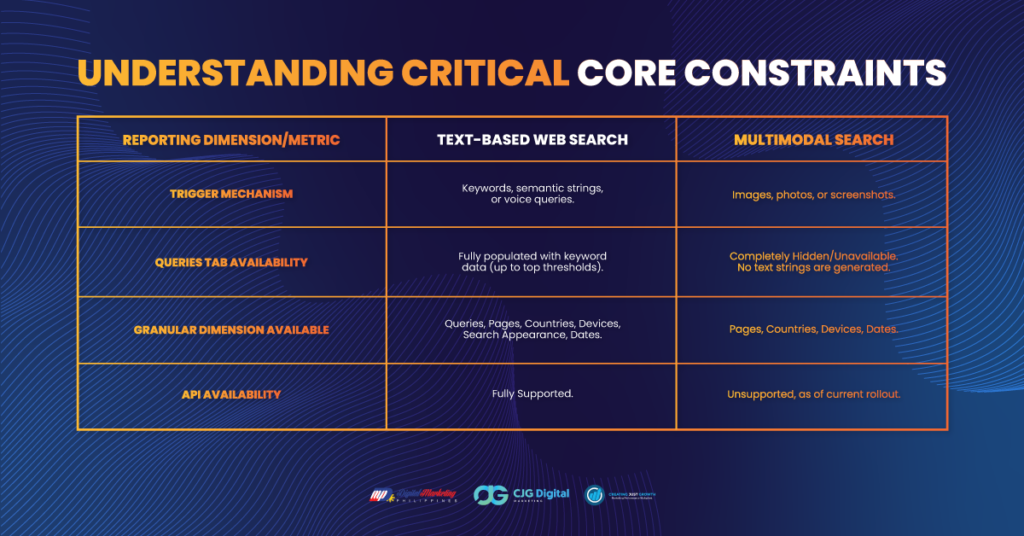
Because users are providing pixel data rather than string data, Google cannot report a text query. Instead, the analytical heavy lifting shifts to page-level analysis, where marketers must reverse-engineer intent based on which pages drive the deepest visual impressions.
Actionable Strategies for Turning GSC Data Into Visual Traffic Growth
Once the initial baseline multimodal performance data is reviewed, brands must hire an SEO expert in the Philippines to create a modern Multimodal SEO strategy:
1. Identify and Defend Multimodal Winners
Start by sorting the Pages tab under the Multimodal filter by total impressions. The leading URLs represent the content that Google’s computer vision models confidently pair with real-world objects.

Image from Search Engine Roundtable
Pages that perform well may include product landing pages, recipe blogs, travel destination guides, and step-by-step technical blueprints. Protect these assets by avoiding breaking changes to image file paths or structural image layouts.
2. Audit Gaps Against Text Performance
SEOs must perform a side-by-side evaluation using the Compare tab. If a vital commercial page ranks extraordinarily well for text-based intent but pulls zero impressions under the Multimodal filter, it may indicate an execution gap in how Google processes the brand’s visual assets.
To prevent this problem, ensure all images are high-resolution, unblurred, and feature clean contrasts so Google’s visual engine can parse the subject matter accurately.
3. Implement Advanced Visual Optimization Basics
To make assets more readable by Lens and Circle to search engines, SEOs must standardize the following technical foundations across low-performing pages:
- Semantic Image Filenames – Instead of using generic strings like IMG_2026.jpg, use keyword-rich, hyphen-separated names like affordable-laptop-for-student.jpg.
- Contextual Alt Text – Write accurate, descriptive alternative text that avoids keyword stuffing and clearly states exactly what is visible in the frame.
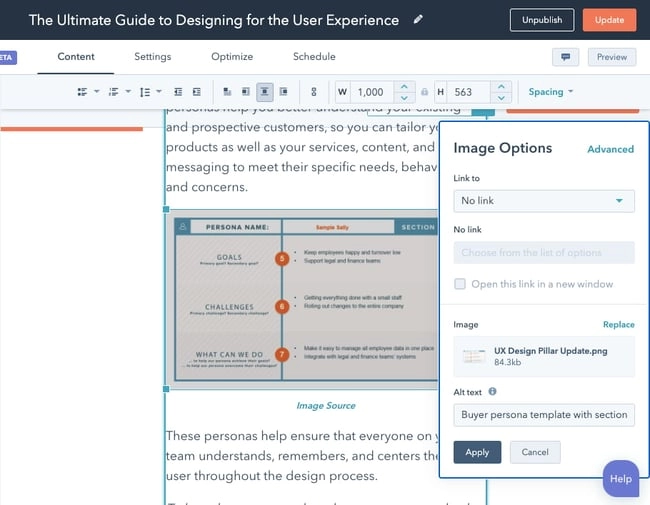
Image from HubSpot
- Structured Data Overlays – Implement explicit schema markup, such as Product, Recipe, or Organization, directly on the target URL. This lets Google match a visual query directly to pricing, inventory availability, or author ratings in real time.
Connect Visual Optimization and Keyword Mapping With DMP
The introduction of the multimodal reporting filter is the much-needed bridge connecting content and camera. SEO teams can leverage this new feature to capture a major competitive advantage in an increasingly visual search system.
Don’t leave your multimodal search potential to chance. If you are looking for world-class yet affordable SEO services in the Philippines, look no further than Digital Marketing Philippines (DMP)! With over a decade of experience in providing competitive and up-to-date SEO packages to brands worldwide, we can equip your business with tailored image SEO strategies and implement full-scale digital search optimizations tailored to modern user behaviors.
Contact Digital Marketing Philippines today to future-proof your web performance.
References:
https://www.seroundtable.com/google-search-console-multimodal-search-type-filter-42156.html
https://developers.google.com/search/blog/2026/09/web-multimodal-in-sc
https://support.google.com/webmasters/answer/7576553?hl=en

Jomer B. Gregorio is a well-rounded expert when it comes digital marketing. Jomer is also known as a semantic SEO evangelist and practitioner. Check out our Digital Marketing Services today and let us help you in achieving positive and profitable results for your business.